A Practical Review of the Boo Watercolor Clipart for Digital Selling
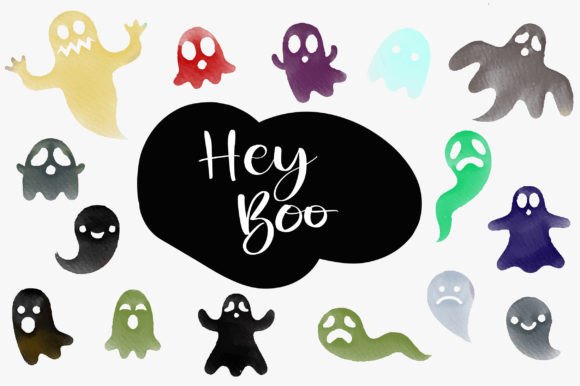
Opening the Boo Watercolor Clipart file, my first impression is a genuine Halloween charm. The style leans toward playful and whimsical, yet with a polished, handmade watercolor aesthetic that feels commercially viable. The designs have a distinct personality—a little spooky, but mostly cute and festive. This isn't a hyper-realistic or overly dark graphic set; it’s decorative and approachable, which I believe will attract a broad audience, from families looking for cute Halloween decor to crafters wanting a friendly theme.
Initial Assessment for a Seasonal Shop
I’m imagining this from the perspective of preparing a new Halloween collection for my Etsy shop or a digital store on Creative Fabrica. The 15 unique watercolor Boo designs present a solid core for a themed bundle. The mood is clearly seasonal and niche, but the soft watercolor style could also appeal beyond strict Halloween, perhaps into a general autumn or whimsical ghost-themed product line for nurseries or lighthearted brands.
Real-World Product Applications
Where does this clipart truly shine in a selling scenario? The provided file types—PNG, JPG, and PDF—point directly to several key uses. The PNGs with transparency are immediately useful for creating sublimation designs for t-shirts, tote bags, and mugs. The watercolor texture would translate beautifully onto textile totes and bed linen, as the description suggests. For printable products like wall art, greeting cards, or invitation templates, the JPG and PDF files offer a ready-to-print foundation.
I see strong potential for integrating these illustrations into Canva templates for social media graphics or blog posts, offering customers a quick, professional-looking seasonal design. For Cricut users, the crucial step would be testing the SVG conversion or ensuring the PNGs have clean enough edges for cutting projects like planner stickers or scrapbooking elements. This set could form the heart of a digital paper pack or a sticker design bundle.
Testing Before You List: A Seller’s Checklist
Before publishing any listing using this graphic design asset, a methodical test is essential. This avoids the common pitfall of discovering a flaw only after a customer purchases.
- Mockup Preview: Place the Boo Watercolor Clipart on actual product mockups—a t-shirt, a mug, a digital wall art frame. Does it look balanced? Does the watercolor detail remain clear when scaled?
- Thumbnail Appeal: How does one of the illustrations look as a small marketplace thumbnail? Is the central “Boo” motif still recognizable amidst other listing images?
- Background Test: Check the PNG transparency on both white and dark backgrounds. Does the ghost design hold its visual hierarchy?
- Print Test: If selling physical printables, print a sample. Verify the colors render as expected and the resolution is sufficient for the intended size.
- File Quality: Inspect the PNG files for any stray pixels or imperfect edges, especially if considering SVG products for Cricut projects where clean cutting lines are critical.
Strengths for Product Presentation
This clipart can significantly enhance how you present your online products. Using a cohesive set like this across a seasonal collection builds brand consistency and tells a visual story. For instance, using different Boo illustrations across your main listing image, promotional social media graphics, and even packaging design creates a professional, unified look. This builds customer trust and increases the perceived value of your bundle.
The watercolor style inherently feels premium and artistic, which can improve click-through potential compared to more generic, flat clipart. It suggests a handmade business touch, even if you’re selling digital downloads.
Strategic Uses and Careful Applications
Knowing where a design asset works best, and where it might falter, is key to successful commercial use.
Where it excels: Large product previews, like featured artwork on a printable poster. Themed bundles where you can showcase multiple illustrations together. Decorative layouts for invitation templates or digital paper where the texture adds depth. Merchandise graphics like mug designs or tumbler wraps where the soft style is appealing. Social media promos and blog graphics that need a quick, eye-catching visual.
Use with caution: Tiny details, such as on very small sticker designs, where the watercolor brushstrokes might blur or become indistinct. Overly complex layouts that could overwhelm the delicate illustrations. Low-resolution print products; always confirm the file size is adequate. Crowded thumbnails where the design competes with too many other elements. Text-heavy templates; these illustrations are likely best as decorative accents rather than backgrounds for lengthy copy.
Practical Seller Notes & Final Considerations
Beyond testing, organization is crucial. When selling the finished digital product, ensure your file structure is clear for the customer. If you’re creating a Canva template or a product that includes text, experiment with pairing the Boo Watercolor Clipart with different font styles. A playful script font might enhance the whimsy, while a clean sans-serif could create a more modern, graphic feel for a t-shirt design.
The most critical step is confirming the commercial license. Assuming this clipart comes with a standard commercial use license for finished products, you can proceed. However, always read the specific terms to ensure your intended use—like selling on print-on-demand platforms or within design bundles on a creative marketplace—is covered.
Ultimately, the Boo Watercolor Clipart is a versatile set of illustrations. For digital product creators targeting Halloween, it provides a cohesive visual foundation. Its strength lies in its applied texture and niche appeal, but its success in your shop will depend on how thoughtfully you integrate it into your specific products, test its limits, and present it professionally to your audience of crafters, designers, and small business owners.